

Mind & Motion
A VR-based chronic pain management app that goes beyond addressing physical pain symptoms. Through graded levels, users engage in gamified exercises that help them overcome fear of movement and rediscover the joy of exercise.
Featuring Pain Neuroscience Education (PNE), developed with pain scientist Dr. Adriaan Louw, users learn how pain works in the brain and nervous system, equipping them with essential coping skills. Additionally, the app integrates mindfulness training, offering guided practices that help users activate their parasympathetic nervous system. This holistic approach empowers members to manage pain flare-ups more effectively, supporting both their physical and emotional well-being.
Made in collaboration with Confluent Health, granting access to 620+ outpatient clinics.
Main Opportunity: Advance Mind & Motion to an at home accessible program, testing usability, motivation, and effectiveness.
Trials & Results
Randomized Controlled Trials (RCT)
PNE-VR Phase I RCT @Evidence In Motion (In preparation)
-
Patients (n=30) with CLBP randomly assigned to Usual Care or Usual Care plus PNE-VR.
-
PNE-VR group yielded a significant (p = 0.04) greater improvement in pain (NPRS).
-
63% of patients in the PNE-VR group met criteria for MCID, while only 27% of the control group evidenced MCID
Case Studies & Real World Data
PNE-VR Case-Report & Case-Series (Louw et al. 20191; Louw et al. 20232)
-
Patients (n=40) with low back, neck, knee, and shoulder pain.
-
Improvements in fear of physical activity, catastrophization, range of motion.
-
Global Rating of Change (GROC) above MCID.
PNE-VR Feasibility @Belmont and Utah University (In review)
-
PT patients (n=52) randomized to PT or PT + PNE-VR.
-
Participant compliance with PNE-VR was 73.7%.
-
PNE-VR scored high in satisfaction and acceptability.
-
Those that received PNE-VR had 2.53 greater odds of achieving the MCID in disability, as measured by the Oswestry Disability Index (ODI)
BehaVR Real World Data (based on 6,692 patients served)
-
Pain Catastrophizing Score (median -18% change*)
-
Perceived Stress Score (median -9% change*)
-
Global Rating of Change (median 2 point improvement*) * All statistically significant changes (p < 0.001)
User Interface
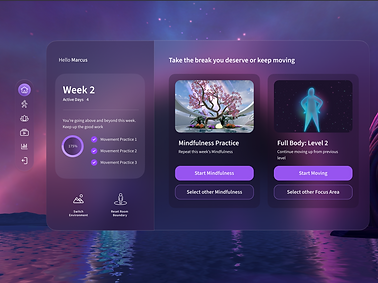
Using VR as a medium means we need to include intuitive UI and interactions to make users feel grounded in immersive environments. With this in mind we were inspired by the Apple Vision Pro and the clean, timeless design of their UI. Each UI panel includes an elegant, glassy panel backing. This helps the panels feel more connected to the surrounding environment.
The users in this program will come in experiencing some sort of chronic pain and potentially some form of kinesiophobia, this means the home menu needs to reflect progress, encouragement, and motivation to continue. The Home Screen that greets the user upon entry has a left panel showing program and weekly progress, while the right panel shows options for the user to quickly launch a recommended activity.
For navigation, there is a vertical bar to which users can go to movement, mindfulness, PNE, or progress & insights submenus. Each week users must complete 1 assessment, 1 PNE video, 3 movements, and 1 mindfulness session, though encouraged to do more. To make this easier on users, the first session of the week is an auto-flow session, meaning they go through 1 of every requirement. From that point on, the user is able to free roam and navigate where they please.


Assessments & PNE
Taking baseline and weekly assessments helps track progression and effectiveness within the program. At the beginning of each week users will take the PEG (Pain intensity and Interference) and the PSEQ (Confidence coping with pain) to see how they are doing. They will also see a graph of their results to track trends in their data. These graphs and insights, as well as other metrics, will be shown upon assessment completion and can be reviewed in detail in the Progress and Insights submenu.

Assessment Design Opportunity:
-
Take a clinical assessment and make the information intuitive
-
Eliminate "extra" info
-
Focus on what the user needs to get out of the graph
-
Hierarchy of necessary information
-
Incorporating insights based on data to reflect how the user is doing
-
-
Incorporate comparative feedback with many responses and tips on how to get better for personalized feedback
Additionally we’ve partnered with renowned pain scientist Dr. Adriaan Louw, PT, PhD, to digitize PNE, an evidence-based curriculum for improving pain coping skills, rooted in understanding how pain works in the brain and nervous system. Within the weekly auto flow session, a PNE video is played before jumping into a movement exercise. Through several trials and studies, we have show significant results in the effectiveness of using PNE to educate users before their movement.
To get warmed up when going into a movement activity, users begin with what we call "breakout". This activity is designed to get your heart rate up and get you ready to move. It starts with a volleyball-like activity with a ball that you must hit in order to break down the wall infant of you. Throughout the activity, speed gradually increases and you change which hand you hit the ball with according to the instruction.
Engagement Mechanics:
-
Color changing ball corresponding to left or right hand
-
Speed of ball increases on hand impact and decreases on its way back to the user
-
Impact based particle effects
-
Hit streak- noticeable speed and sound increase
-
Personalized boundaries based on calibration. The ball with travel within your reach and slightly beyond to make sure you get moving.
Light Paths (Main Exercise)
Users experience gamified exercises designed to help overcome fear of movement and bring joy back to exercise. Movements start gently and become more challenging as they progress in the program. There are 5 targeted movement areas and each area has 3 levels of difficulty. Designed along side expert physical therapists, each targeted movement exercise helps increase mobility and range of motion.

To design the exercises in these sessions we recorded footage of physical therapists doing exercises to help each of the body areas we focus on. From there we generated a "playlist" and gradated the movement into 3 levels. Instead of being told to complete a movement, users take their controllers and trace a light path which inherently has them completing the movement without realizing. Each light path is color coordinated to the hand you trace it with. Additionally, there are also head, eye, and 2 handed light paths that allow for full body movements to be completed.
To generate light paths for these sessions, we utilized a tool that allowed us to physically trace the movement patterns with our hands, capturing the precise shapes and flows of each motion. Then, we take these shapes and scale them to be tailored to each users height and range of motion, personalizing every experience.
Engagement Mechanics:
-
Color changing path corresponding to left, right, or both hands
-
Tracing particle effects
-
Arrows connecting you to the start of each path
-
Haptic feedback
-
Immersive sound effects
To treat both the mind and body, Mind and Motion provides guided mindfulness practices that progressively build on each other. These sessions incorporate mindful awareness and deep breathing techniques to activate the parasympathetic nervous system, helping members manage pain flare-ups with greater confidence and control. These scenes were licensed from Mindway, a VR company based in Turkey.
Each movement session is tailored to the user, their height, and their current range of motion. It is designed to move you within your limits and progressively move you slightly beyond them to encourage improvement. The way we calculate this is at the beginning and end of each session, the user will complete "calibration" which is a series of 4 poses to track your beginning and end range of motion. These poses allow for use to generate a clear sector to place the activities within and to track progress.

By taking these pre and post measurements, we are able to generate a range of motion summary and show this at the end of each movement along with other interesting metrics. The main focus of the program is to get users moving and show them the success of what they did. These complete the movement feedback loop by letting users know how they are doing and then encouraging them to keep getting better by practicing more.
Every time we take a measurement or track how the user is doing, we let them know why and how we are doing so, also allowing them to see their progress and insights on all the data we have collected in the program so far.


Progression
During each movement we wanted users to feel rewarded just for getting up and moving. To achieve this we added in 5 levels of progression to go along with each session. When they enter movement the environment is standard, but the more they move, the more glowing and alive with particles it becomes. Their movement brings life to the world around them.
Breakout (Warm-Up)

Mindfulness
Feedback Loops
THE PROCESS

User Tester Quotes
"Usually in physical therapy I'm watching the clock to see when the sessions going to be over... but this was fun!"